Set up email notifications for encryption password changes
In some sites, Admin users can choose to receive emails when job encryption passwords change.
Admin users in a parent site can receive emails when job encryption passwords change in the parent site and in its child sites. Admin users in a child site can receive emails when job encryption passwords change in the child site only.
Super users specify whether Admin users in a site can receive encryption password change emails.
When email notifications are configured centrally in a Portal instance, additional notification email addresses can be specified for each child site.
Note: Email notifications selected in Admin users' profile settings are only sent in English. Email notifications for child site email addresses are supported in multiple languages.
To set up email notifications for encryption password changes:
-
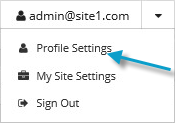
When signed in as an Admin user, click your email address at the top right of the Portal page.
The user menu appears.
-
Click Profile Settings.
Your user profile appears. If your profile includes an Email Notification Settings section with an Encryption Password Changed option, you can choose to receive emails when encryption passwords change.
-
In the Email Notification Settings list, select the Encryption Password Changed option.
-
Click Update notifications.