Set up email backup notifications
To help you monitor your backups, you can receive emails when backups finish or fail on Windows or Linux computers, and in VMware vSphere environments.
You can select the backup statuses for which you want to receive email notifications.
To set up email backup notifications:
-
In a web browser, go to the Portal website and sign in.
-
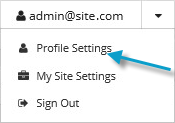
Click your email address on the Portal page.
The user menu appears.
-
Click Profile Settings.
Your profile appears. Your profile includes Email Notification Settings.
-
In the Email Notification Settings list, select any events (e.g., Backup Completed, Backup Failed, Backup Skipped) for which you want to receive emails.
-
Cilck Update notifications.