Determine whether an agent has been configured automatically
Beginning with Portal 8.89 and Windows Agent 8.90a, backups can be configured automatically on Windows servers based on job templates. The Windows agent must be installed with a default encryption password and registered to a Portal site where agent auto-configuration is enabled.
When agent auto-configuration is enabled, Portal finds and auto-configures eligible Windows agents every three minutes. When an agent is successfully configured, a backup job for the Windows server is created that has:
-
The name, description, settings and schedules specified by the job template selected for the child site.
-
A randomly-assigned time for running backups with “Days of Week” and “Days of Month” schedules. By default, the time will be between 8 PM and 8 AM, but a different time window might be specified in your Portal instance.
-
The vault profile selected for the child site.
-
The default data encryption password specified when the agent was installed.
To determine whether an agent has been configured automatically, you can view the agent on the Computers page in Portal. If the agent has not been configured, an auto-configuration status message appears.
To determine whether an agent has been configured automatically:
-
Sign in to Portal as an Admin user in a child site where agent auto-configuration is enabled, or as a parent site Admin user who can manage the child site.
-
Do one of the following:
-
On the navigation bar, click Computers. On the Computers page, find the computer for which you want to view the auto-configuration status. Click the computer row to expand it.
-
On the navigation bar, click Dashboard. In the Notification Center, click What’s New. In the center of the dashboard, find the notification of the computer and click its Configure Now link. The computer row is shown on the Computers page.
Note: If the computer is unconfigured and offline, you cannot expand the computer row. An agent cannot be configured automatically if it is offline after it registers to Portal. If an agent stays offline for seven days after registering to Portal, backups cannot be automatically configured on the server. If the agent comes online after seven days, an "automatic configuration has failed" message appears for the agent.
If a job appears in the computer row, the agent has been configured. If the agent was configured automatically, the job has the name, settings and schedule specified by the job template for the child site.
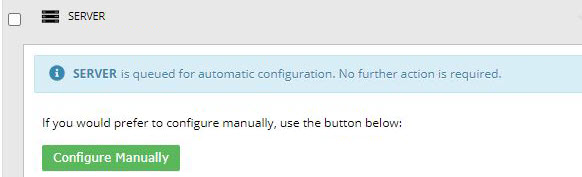
If a "queued for automatic configuration" message appears in the computer row, the agent is waiting to be configured. Portal will attempt to configure the agent in the next three minutes.
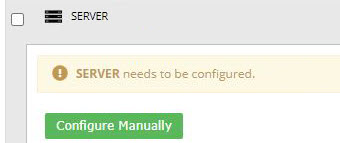
If a "needs to be configured" message appears in the computer row, the agent is not eligible for auto-configuration and you must create a backup job manually. For more information, see Reasons that agents are not eligible for auto-configuration.
If a "queued for automatic configuration but x of 3 attempts have failed" message appears in the computer row, an auto-configuration attempt failed. Portal will attempt to configure the agent again in the next three minutes.
Note: Portal attempts to configure backups on a server three times after an agent is registered to Portal.
If error information is available, the second sentence of the message (shown in a green rectangle, below) describes the issue.

If an "automatic configuration has failed" message appears, three auto-configuration attempts failed. Please create a backup job manually.
If error information is available, the second sentence of the message (shown in a green rectangle, below) describes the issue.

-