Specify whether scheduled backups retry after a failure
You can specify whether scheduled backups automatically retry if they do not run successfully.
You can also specify how many times a scheduled backup should retry after a failed attempt, and specify the amount of time between retries.
Note: Automatic retry settings only apply to scheduled backups. A backup will not retry automatically after a failed ad-hoc backup attempt.
To specify whether scheduled backups retry after a failure:
-
Do one of the following:
-
On the navigation bar, click Computers. Find the computer for specifying automatic retry settings, and click the row to expand its view. On the Jobs tab, in the Select Action menu for a job, click View/Add Schedule.
-
Create a new backup job. The View/Add Schedule dialog box appears when you save the job.
-
-
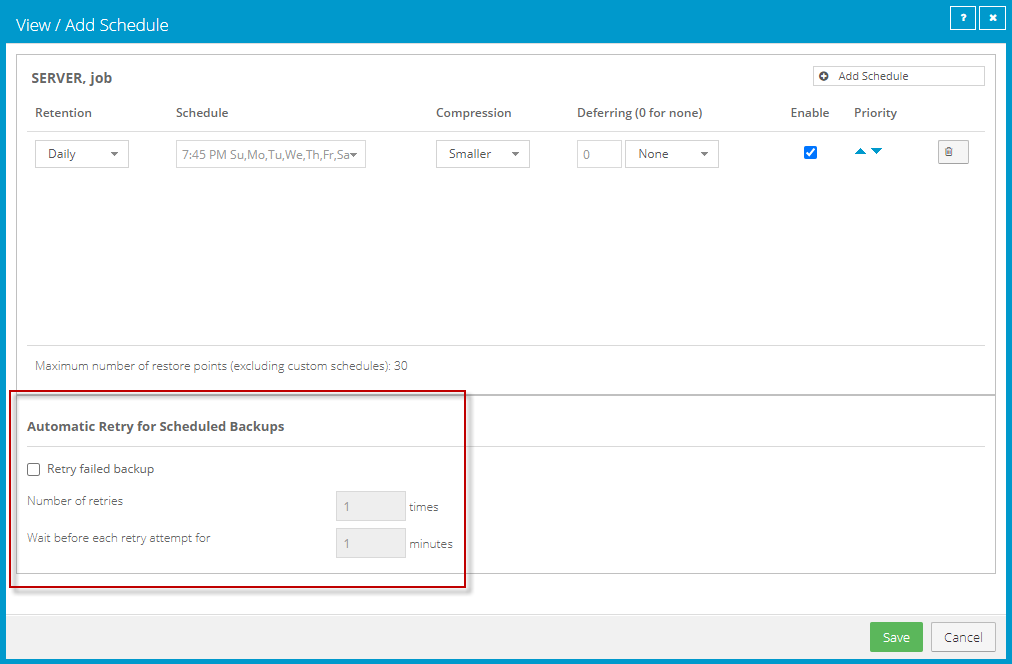
In the Automatic Retry for Scheduled Backups section, do one of the following:
Note: Automatic retry settings are only available for computers with Windows or Linux Agent version 8.60 or later, and environments with vSphere Recovery Agent version 8.80 or later.
-
To specify that scheduled backups should not retry after failed backup attempts, clear the Retry failed job check box.
-
To specify that scheduled backups should retry after failed backup attempts, select the Retry failed job check box. In the Number of retries box, enter the number of times the backup should try again. In the Wait before each retry attempt for [ ] minutes box, enter the number of minutes that the agent should wait before the next backup attempt.
-
-
Click Save.