Change your password
You can change your password any time you are signed in to Portal.
If you sign in to Portal using single sign-on credentials, you cannot change your password using this procedure; you must change your password outside of Portal. However, Admin and regular users with single sign-on credentials can set Agent Registration passwords in Portal. See Change your Agent Registration password.
To change your password:
-
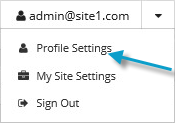
At the top of the Portal page, click the email address that you used to sign in to Portal.
A user menu appears.
-
Click Profile Settings.
Your profile appears. Your profile includes a section for changing your password.
-
In the Current Password box, type your current password.
-
In the New Password and Confirm New Password boxes, type your new password.
Your new password must meet the requirements shown on the page.
-
Click Update Password.